STUDIO NOTES
Good ideas
need room.
m.
01
A desk with room to breathe.
02
A list that moves at your pace.
03
One idea leading to the next.
04
Less effort, more focus.
05
The details make the difference.
06
A SMALL CHANGE. A BIG DIFFERENCE.
The mouse you love, with the fluid feel your Mac deserves. Smooth scrolling, intuitive gestures and buttons that work your way.
For macOS 13 or laterGetting ready for launch
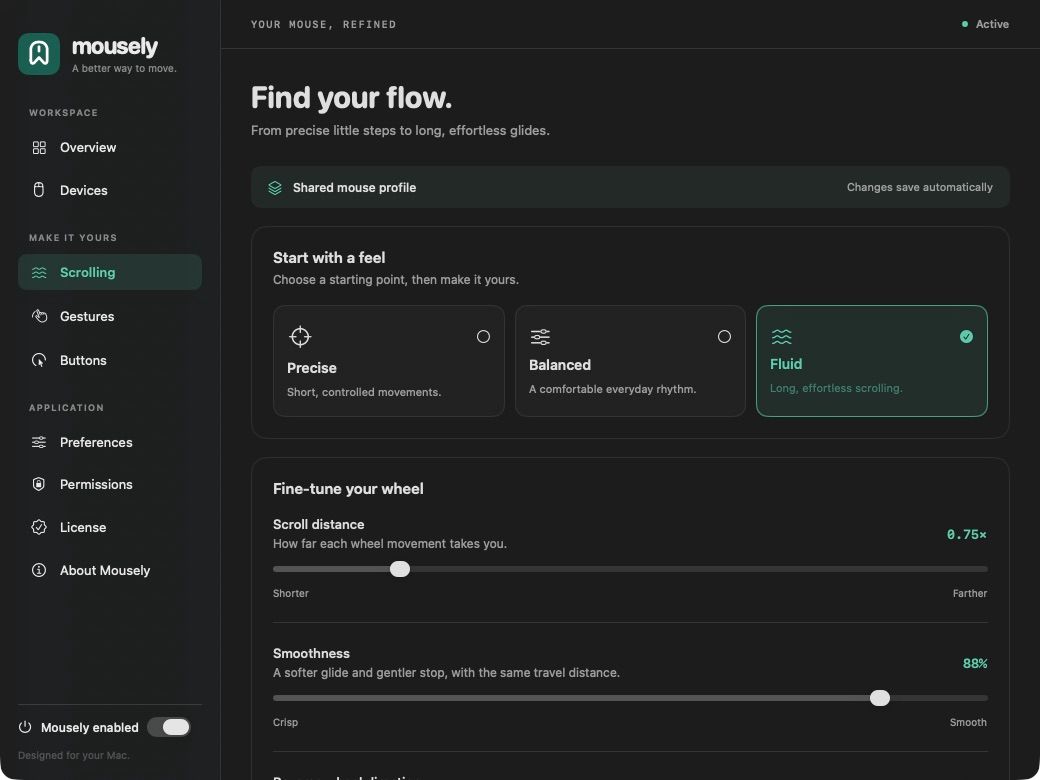
The real app. Mousely on macOS.
FEWER JUMPS. MORE FLOW.
A mouse wheel moves in steps. Mousely turns those steps into continuous motion, with a natural slowdown. You choose just how smooth you want it.
An animated comparison that looks the same with any mouse. No scrolling needed.
YOUR DAY, WITH FEWER CLICKS.
Small controls that become second nature. Set up what you use. Fine-tune what you feel.
Hold a button and move your mouse: switch desktops, open Mission Control or see your app’s windows. Pick your trigger button and the action for each direction.
Back, forward, play or pause, Mission Control, or a custom keyboard shortcut. Give your mouse buttons the actions you actually need.
Hold and move your mouse to scroll through larger content. Adjust sensitivity and inertia for a movement that feels comfortable.
 ◒Mousely
Pause Mousely, tweak smoothness or choose a profile from the menu bar. Each mouse can have its own settings, and the app speaks English and Spanish.
MADE TO FIT RIGHT IN.
Mousely is a native macOS app built for external mice with scroll wheels. No new hardware needed. Start with the mouse you already have.
Compatibility and available buttons depend on your mouse and how each app handles scrolling. The trial will let you check your setup.
Download the app when it’s available and move it to Applications.
Enable Accessibility and Input Monitoring in macOS so it can improve your mouse events.
Pick a profile, fine-tune smoothness, and assign your buttons and gestures.
SIMPLE FROM THE FIRST CLICK.
There isn’t a subscription. We’re planning one payment per Mac and a full trial so you can take your time deciding.
The commercial release will offer 30 days to try every feature, with no card required. Downloads and purchases will open when the app is ready.
USD · one payment per Mac
Another Mac? You’ll need another license.
Planned launch price. Applicable taxes are shown at checkout.
GOOD QUESTIONS. CLEAR ANSWERS.
Everything you want to know before you begin.
Read the setup guideA native macOS app that makes external mice feel better: smoother wheel scrolling, customizable button actions, and gestures you trigger by holding a button and moving your mouse.
Mousely requires macOS 13 or later. It is designed for standard external USB or Bluetooth mice, especially those with a scroll wheel. Available buttons depend on the model and its driver. Distribution for Intel and Apple Silicon is being prepared.
Mousely aims for more continuous, natural scrolling inspired by a trackpad. It uses your mouse’s wheel and buttons; it does not add touch sensors or reproduce every trackpad gesture.
Wheel smoothing is designed for external mice. Precise scrolling events from your trackpad keep their native behavior.
Yes. You can tune smoothness, distance and scrolling direction. Precise, Balanced and Fluid profiles give you starting points to make your own.
Choose a trigger button, hold it, then move your mouse in a direction. Each direction can have a different action, such as switching desktops or opening Mission Control.
Accessibility and Input Monitoring let Mousely receive and generate the mouse events needed for scrolling, gestures and buttons. macOS manages these permissions; you can revoke them in Privacy & Security.
No. The planned model is a one-time payment per Mac, including updates to Mousely 1.x. Terms for future major versions will be decided separately.
No. Each license activates one Mac. You can configure multiple mice on that Mac, but another Mac needs another license. The process for moving a license between computers is being prepared.
At commercial launch, you’ll be able to start a full 30-day trial in the app, without a card. After it ends, a license will be required to keep using the enhancements; your mouse will continue to work normally.
Everyday mouse input is processed on your Mac. The commercial version will need internet to start a trial and activate a license. The paid license is designed for offline use after activation.
We’re still preparing distribution and commercial activation. This site introduces the features and licensing model. Download and purchase links will open once launch preparations are complete.
Your next favorite mouse might be the one you already own.
See the difference again